


When a public campaign site asks people for names, phone numbers, addresses, email addresses, issue details, locations, and photos, the privacy and security basics have to be boringly solid. This is especially true for environmental, health, infrastructure, and community-reporting projects, because people may share sensitive details about where they live, what they witnessed, and how they can be contacted.
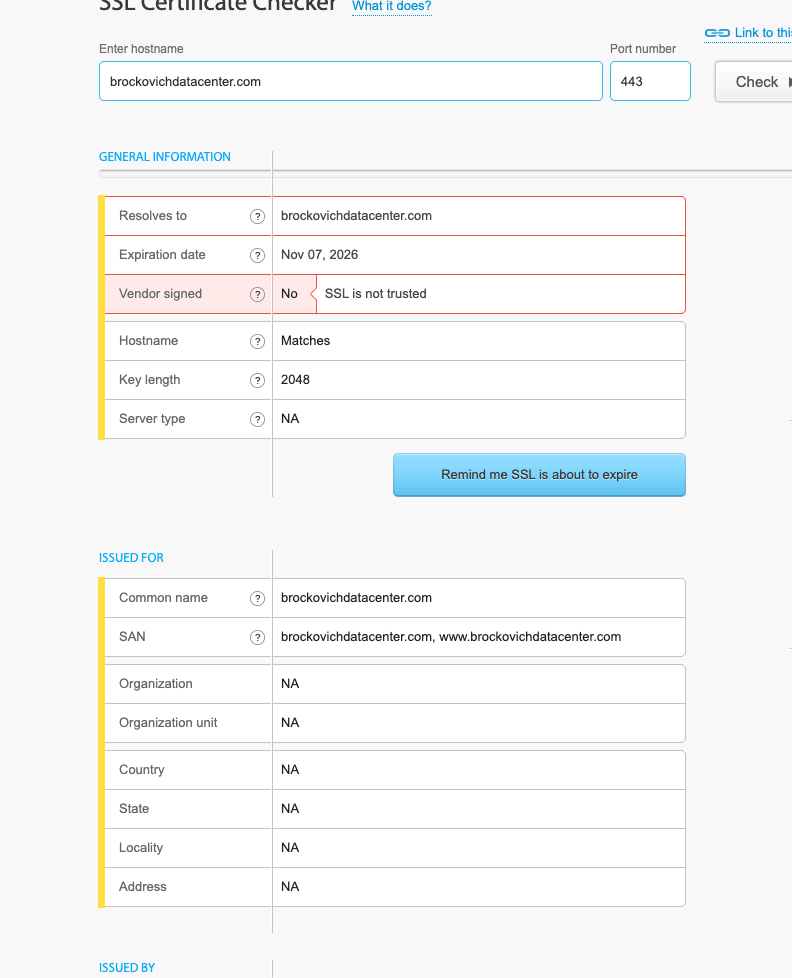
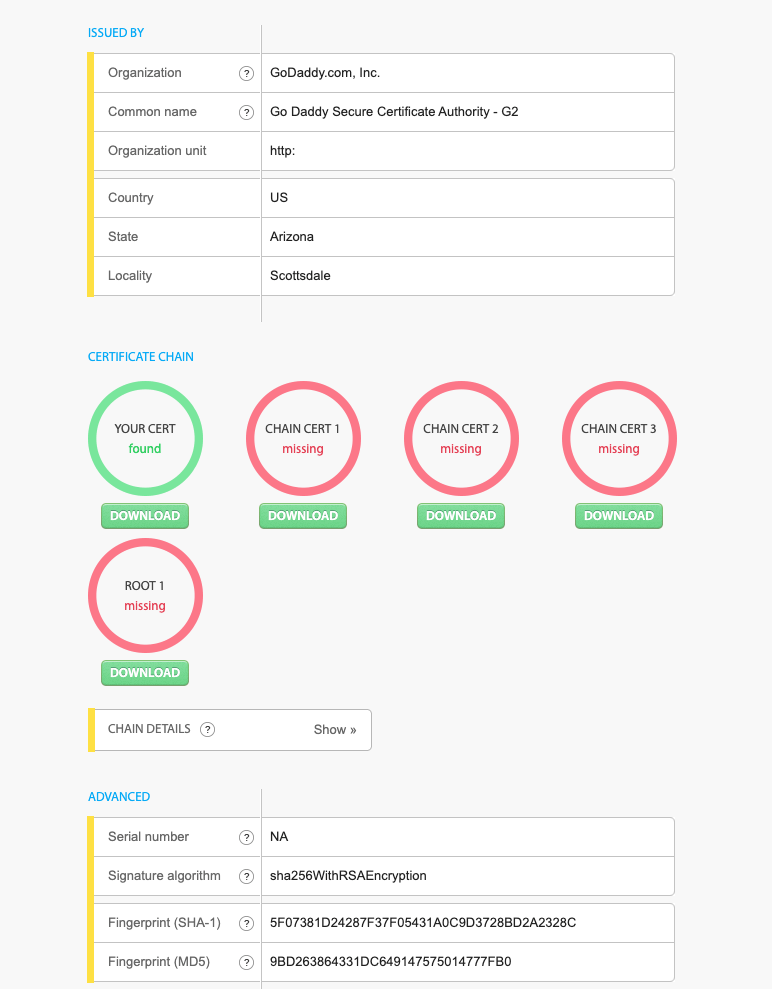
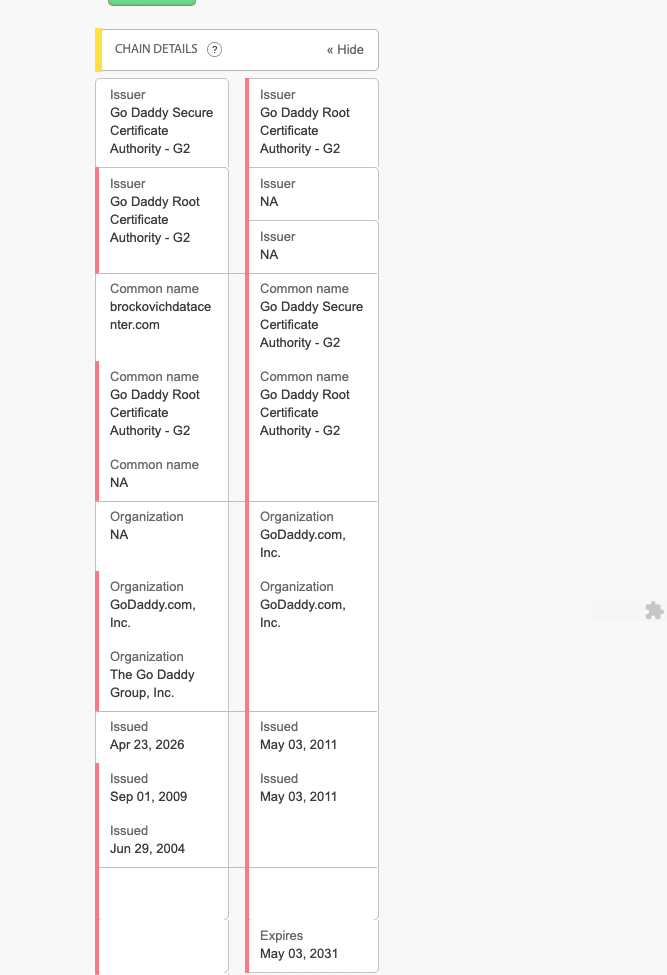
A reader flagged the Brockovich Data Center Reporting site after SSLChecker.com showed a trust warning for brockovichdatacenter.com. The screenshot reported “SSL is not trusted” and showed missing chain/root items. That is enough to pause and verify before submitting personal information.




What We Verified
The public data center reporting page was reachable at brockovichdatacenter.com on May 26, 2026. The visible report form asked for name, phone, address, email, the AI data center location, owner/company if known, project status, issue details, other comments, and optional photo uploads. It also linked to terms and privacy pages and submitted through a third-party form service.
Our follow-up command-line check did not reproduce a universal browser-breaking certificate failure. A direct OpenSSL check saw a GoDaddy-issued certificate for brockovichdatacenter.com and www.brockovichdatacenter.com, valid from April 23, 2026 to November 7, 2026, and returned certificate verification code 0. The server presented the site certificate and a GoDaddy intermediate certificate.
That creates the real story: the public trust signals were inconsistent. If one public checker reports a chain problem while another client verifies successfully, the site owner should still investigate and document the TLS setup before encouraging people to submit personal reports and photos.
Important TLS Detail
A web server normally sends the site certificate plus any needed intermediate certificate. The trusted root certificate is usually already in the visitor’s browser or operating system and is not normally sent by the server. So “root missing” by itself is not always the right diagnosis. The practical question is whether normal browsers and independent TLS tools can build a trusted chain without warnings.
Security Must Come Before Collection
A public form should not wait until after launch to figure out HTTPS, HSTS, security headers, upload handling, or privacy language. If a site asks for more than a simple email address, especially names, phone numbers, street addresses, issue details, and photos, those controls should be in place before collection starts.
For a data-collection site, the baseline is not just “there is a certificate.” The baseline should include a clean certificate chain, HTTP to HTTPS redirect behavior, a tested Strict-Transport-Security policy after HTTPS is confirmed, sensible security headers, private upload storage, limited admin access, retention rules, deletion rules, and a privacy page that explains the workflow in plain English.
If those pieces are missing or unclear, the public is being asked to trust a campaign before the campaign has shown how it protects the data it is collecting.
Photo Uploads, EXIF Metadata, And Consent
Photo uploads deserve their own warning. A photo can reveal more than the picture itself. Depending on the device and settings, the original file may include EXIF or file metadata such as GPS coordinates, the date and time the photo was taken, device model, software, and sometimes names or account-related details. The image may also show faces, home addresses, license plates, workplace signs, utility equipment, documents, or children.
Before asking residents to upload photos, a privacy page should say whether original files are stored, whether metadata is stripped, who can view uploads, how long uploads are retained, whether files are shared with partners or media contacts, and how someone can ask for deletion. If the privacy page does not answer those questions, submitters should assume the original file and its metadata may be kept.
Why This Matters
- Exact contact details and addresses can identify a person and household.
- Environmental or health-related reports can reveal sensitive community, workplace, or family context.
- Photo uploads may include location metadata, faces, addresses, license plates, utility bills, or other private details.
- Third-party form processors must be covered by a clear privacy and vendor-management plan.
- Public campaigns can collect data from residents in states with privacy requirements, including California and Colorado.
What The Site Operator Should Check
- Run the hostname through multiple TLS tools, including browser certificate details, OpenSSL, SSL Labs, and the checker that produced the warning.
- Confirm the server presents the leaf certificate and correct intermediate chain for both the bare and
wwwhostnames. - Redirect HTTP to HTTPS only after the certificate chain is confirmed clean.
- Review TLS versions, cipher configuration, mixed content, and security headers.
- Document what personal data is collected, why it is needed, who receives it, how long it is kept, and how a person can request deletion or correction.
- Confirm the form vendor, upload handling, spam controls, retention settings, access controls, and incident-response path.
- Do not collect phone numbers, street addresses, photo uploads, or detailed personal reports until TLS, HSTS, security headers, privacy language, upload storage, retention, deletion, and access controls are ready.
- Confirm whether uploaded photos keep or strip EXIF metadata, including GPS/location fields, and disclose that clearly before upload.
- Keep uploads private by default, restrict who can download originals, and avoid sharing originals externally unless the submitter knowingly agreed.
- Explain whether the form vendor, campaign team, contractors, advocacy partners, or media contacts can access submitted reports and uploaded files.
- Minimize collection where possible. If a city or ZIP code is enough, do not ask for a full street address by default.
- Strip or warn about photo metadata when photos may identify exact locations or people.
What Residents Should Do Before Submitting
- Do not submit personal information if the browser shows a certificate or privacy warning.
- Read the privacy policy and terms before sending a report.
- Share the minimum information needed to make the report useful.
- Remove sensitive photo metadata before upload if the photo does not need it.
- If the privacy page does not explain photo metadata, retention, sharing, and deletion, treat the upload as if the original file may be stored and reviewed.
- Do not send a street address or phone number unless the site explains why it needs that field and how it protects it.
- Use official public-comment, zoning, utility, environmental, or regulator channels when the issue needs a formal record.
- Keep your own copy of what you submitted and when.
California And Colorado Note
This article is not a legal finding and does not claim that the site operator violated California or Colorado law. Applicability depends on facts such as who controls the data, where users are located, how the data is used, whether it is sold or shared, organization size, revenue, thresholds, and exemptions. But the California Consumer Privacy Act and the Colorado Privacy Act are reminders that public-facing data collection should include clear notices, data minimization, security controls, and a way for people to understand and exercise applicable privacy rights.
Fix I.T. Phill Recommendation
Data center accountability is a legitimate public issue. Privacy hygiene is also a legitimate public issue. If a campaign asks people to identify themselves, describe local concerns, and upload photos, the trust chain should be clean, the privacy policy should be plain, and the data lifecycle should be documented before the form is promoted widely.
Related Fix I.T. Phill Guides
- How to Install an SSL Certificate for WordPress
- How to Use AutoSSL and Let’s Encrypt Safely
- How to Force HTTPS Without Breaking WordPress
- How to Fix Mixed Content After Enabling SSL
- How to Write a Domain, DNS, and Email Launch Checklist for Clients
- How to Maintain a WordPress Website: Complete Business Checklist
- How to Back Up WordPress: Complete Methods Guide
- Help4 Network hosting and website support
Sources Checked
- Brockovich Data Center Reporting
- Brockovich Data Center Reporting Privacy Policy
- Brockovich Data Center Reporting Terms of Service
- FTC: Protecting Personal Information, A Guide for Business
- FTC: Start with Security, A Guide for Business
- California Attorney General: California Consumer Privacy Act
- Colorado Attorney General: Colorado Privacy Act
- OWASP Transport Layer Security Cheat Sheet
- OWASP HTTP Strict Transport Security Cheat Sheet
- OWASP Secure Headers Project
- OWASP File Upload Cheat Sheet
- EFF Surveillance Self-Defense: Why Metadata Matters
- Formspree Security
- Formspree File Uploads Documentation