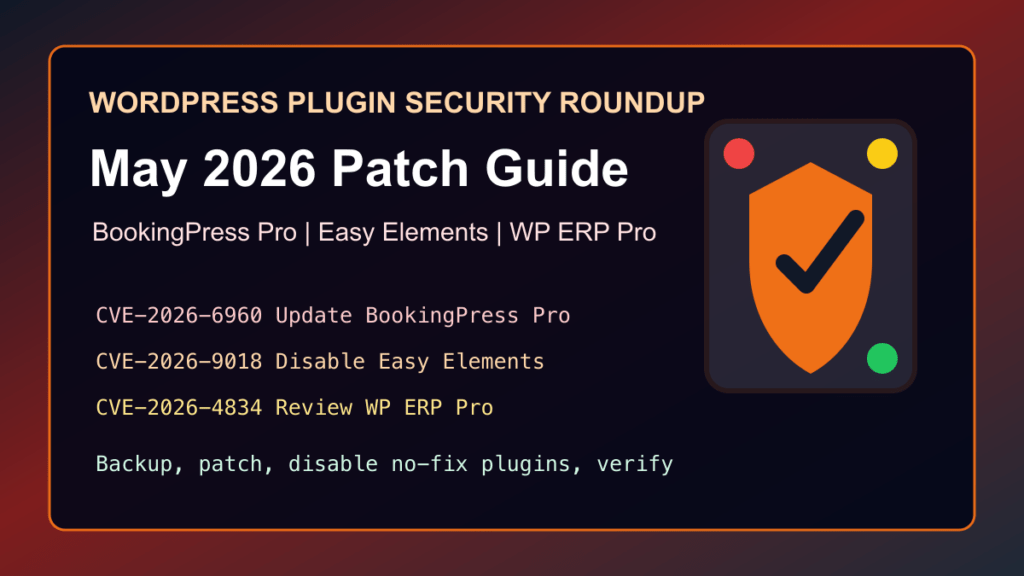
Impact statement: Patchstack published several high-priority WordPress plugin disclosures on May 22, 2026 that matter for site owners, agencies, and web-hosting admins. The highest-risk items in this pass are BookingPress Appointment Booking Pro CVE-2026-6960, Easy Elements for Elementor CVE-2026-9018, and WP ERP Pro CVE-2026-4834. These are not routine low-risk plugin notes. They involve unauthenticated file upload, unauthenticated privilege escalation, and unauthenticated SQL injection risk.
This guide is defensive only. It explains what to update, what to disable when no trustworthy fix is available, what to review after patching, and what to tell customers. It does not include attack steps, request details, sensitive file names, or reproduction material.
Affected Plugins
| Plugin | CVE | Affected versions | Fixed or safe action | Why it matters |
|---|---|---|---|---|
| BookingPress Appointment Booking Pro | CVE-2026-6960 | 5.6 and older | Update to 5.7 or newer | Patchstack rates this CVSS 10 and lists unauthenticated arbitrary file upload risk. |
| Easy Elements for Elementor – Addons & Website Templates | CVE-2026-9018 | 1.4.5 and older | Disable and remove until a reviewed fixed release is clearly available | Patchstack lists unauthenticated privilege escalation risk. WordPress.org currently says the plugin is closed pending full review. |
| WP ERP Pro | CVE-2026-4834 | 1.5.1 and older | Disable the Pro extension until the vendor ships and documents a fixed release | Patchstack lists unauthenticated SQL injection risk and no official patch at publication time. |
What To Do First
- Inventory every WordPress site. Check production, staging, dev copies, abandoned client sites, and old multisite installs. These plugin families are more likely to appear on business, booking, Elementor, CRM, HR, and accounting sites.
- Take a backup before changes. Save a current file backup and database backup. For hosted customers, confirm that the backup restore path has been tested recently.
- Patch BookingPress Pro first. If BookingPress Appointment Booking Pro is installed, update it to 5.7 or newer. The vendor changelog lists 5.7 on May 8, 2026 and 5.7.1 on May 15, 2026.
- Disable no-fix plugins. If Easy Elements or WP ERP Pro are present and you cannot verify a vendor-reviewed fixed release, disable them, restrict access to the site, and plan a replacement or vendor-supported upgrade.
- Review for changes after the maintenance window. Check administrator users, recently modified plugin files, recently uploaded files, unexpected executable files under writable directories, and application logs.
Safe Version Checks
From the WordPress dashboard, go to Plugins and search for BookingPress, Easy Elements, WP ERP, and related Pro add-ons. On managed hosting, also check clone/staging environments because they can preserve old plugin copies after the live site has been updated.
If you use WP-CLI on your own server, a normal inventory check is safe:
wp plugin list --status=active
wp plugin list --status=inactive
For agencies and hosting providers, export plugin inventories from your management panel or RMM tool and sort by slug/name. Do not assume the free and Pro versions have the same patch status. Pro extensions often update outside the WordPress.org plugin directory.
BookingPress Pro Patch Path
For BookingPress Appointment Booking Pro, Patchstack lists CVE-2026-6960 as fixed in version 5.7. The practical path is:
- Back up the site files and database.
- Update BookingPress Pro to 5.7 or newer from the vendor-supported update channel.
- Confirm appointments, staff calendars, payment settings, coupons, notifications, and customer booking forms still work.
- Check uploads and writable directories for unexpected executable files.
- Review recent administrator and staff user changes.
No-Fix Guidance For Easy Elements
Patchstack lists Easy Elements CVE-2026-9018 as high priority with no official patch available. WordPress.org also says the plugin is closed as of May 19, 2026 pending full review. Treat that combination as a stop-use signal until the plugin is reopened with a clear fixed release and review status.
Temporary mitigation:
- Disable the plugin.
- Restrict site administration to trusted networks where possible.
- Keep CDN/WAF protections enabled for WordPress login, registration, and administrator flows.
- Review new users, role changes, and recently modified theme or plugin files.
Long-term replacement:
- Replace affected Elementor widgets with Elementor core widgets, a maintained addon with a clear security history, or custom theme code.
- Document which pages used the plugin before removing it so layouts can be rebuilt cleanly.
- Remove the plugin files after the replacement is tested.
No-Fix Guidance For WP ERP Pro
Patchstack lists WP ERP Pro CVE-2026-4834 as high priority and says no official patch is available at publication time. The free WordPress.org WP ERP plugin is a related product, but the disclosure names the Pro plugin, so inventory both the free base plugin and paid Pro extension before deciding what to disable.
Temporary mitigation:
- Disable WP ERP Pro if it is installed and no fixed Pro release is available from the vendor.
- Limit WordPress administrator access to trusted users and trusted networks.
- Review CRM, HR, accounting, employee, customer, and WooCommerce-linked records for unexpected changes or access.
- Review database backups and confirm you can restore a clean copy if later evidence shows tampering.
Long-term replacement:
- Ask the vendor for the fixed Pro version and release notes before re-enabling the plugin.
- If the vendor response is not clear, plan a migration to a maintained CRM, HR, accounting, or business-management tool.
- Export business records before removing the extension, then test forms, customer records, invoices, employee records, and WooCommerce CRM links after migration.
Hosting Provider Checklist
- Search fleet plugin inventories for BookingPress, Easy Elements, WP ERP, and Pro add-on directories.
- Notify affected customers before disabling business-critical booking or ERP functionality.
- Take account-level backups before plugin removal or major version updates.
- Review web server logs and WordPress security logs for unusual unauthenticated access patterns.
- Look for unexpected executable files in upload and cache locations.
- Confirm file permissions after cleanup.
- Purge page cache, object cache, CDN cache, and any plugin-generated static assets after the update.
Customer Communication
Use plain language with customers. Example:
We found a high-risk WordPress plugin advisory affecting one or more booking, Elementor, or ERP-related plugins. We are taking a backup, updating the plugins that have fixed releases, temporarily disabling plugins that do not have a verified fix, and checking for unexpected site changes. Some booking, page-builder, CRM, HR, or accounting features may be briefly unavailable while we protect the site.