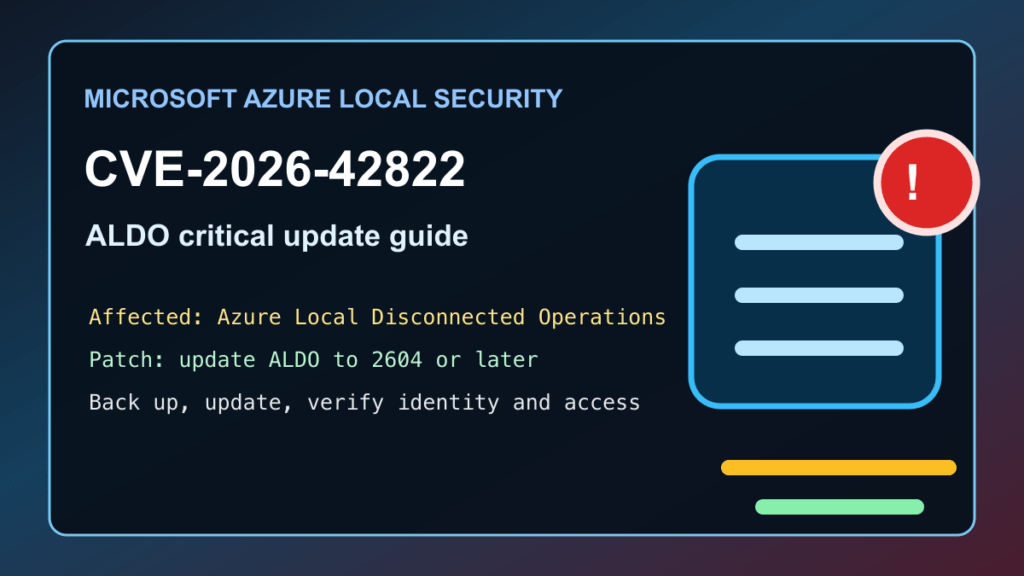
Impact statement: CVE-2026-42822 is a Critical Microsoft vulnerability in Azure Local Disconnected Operations, also called ALDO. Microsoft rates it CVSS 10.0 and says improper authentication can allow an unauthorized attacker to gain elevated privileges over a network. This is not a normal public Azure issue for most tenants. Microsoft says its operated Azure Resource Manager environments are already mitigated, but customers running ALDO must update their disconnected operations environment to version 2604 or later.
This matters for organizations using Azure Local in restricted, disconnected, regulated, industrial, government, edge, or hybrid infrastructure environments. Those systems are often treated as highly trusted management planes. If ALDO is present, patch planning should be handled like a control-plane update, not like a routine workstation patch.
Who Needs To Check
- Customers approved for Azure Local Disconnected Operations.
- Teams running Azure Local appliances in disconnected or limited-connectivity environments.
- Administrators responsible for Azure Local control-plane operations, hybrid infrastructure, edge clusters, or regulated offline environments.
- Security teams that manage privileged access, local identity, LDAP, backup, or break-glass procedures for Azure Local.
If you only use Microsoft-operated Azure services through the normal Azure Resource Manager environment, Microsoft says there is no customer action for this specific issue. If you run ALDO, there is customer action required.
Affected And Fixed Versions
| Product | Affected state | Fixed state | Admin action |
|---|---|---|---|
| Azure Local Disconnected Operations | ALDO environments older than the current protected release path | Version 2604 or later | Apply the full ALDO system update through Microsoft-supported Azure Local update workflow. |
| Microsoft-operated Azure Resource Manager environments | Microsoft-managed Azure service path | Mitigation already deployed by Microsoft | No customer action for this CVE, according to Microsoft. |
Exploitation Status
Microsoft lists this issue as not publicly disclosed and not exploited at publication time, but also marks exploitation as more likely. Treat that combination seriously: patch before public attention turns into opportunistic checking.
What To Patch
Update Azure Local Disconnected Operations to version 2604 or later. Microsoft says ALDO updates are not standalone patches. They must be applied as a full system update through the Azure portal and the supported Azure Local disconnected operations process. Because ALDO is a restricted offering, approved customers may need allow-listed access before the update is available.
This is different from normal Windows Server patching. Do not expect Windows Update, WSUS, Intune, or Microsoft Update Catalog alone to resolve ALDO. Those tools still matter for the Windows Server hosts, admin workstations, browser clients, and support machines around the environment, but the ALDO fix itself is the Azure Local disconnected operations full system update.
Safe Admin Checklist
- Confirm whether ALDO is deployed. Inventory Azure Local environments, disconnected operations appliances, and restricted edge deployments.
- Confirm the current ALDO version. Compare the installed release to Microsoft guidance and target version 2604 or later.
- Plan a control-plane maintenance window. Microsoft notes that updates can take several hours and can reboot the control-plane appliance.
- Export and secure recovery material. Confirm BitLocker recovery keys and break-glass access before starting the update.
- Validate identity health. Check LDAP or external identity configuration before triggering the update, especially in disconnected environments where expired credentials can stop progress.
- Back up first. Confirm Azure Local and ALDO backup and restore plans before making a full system change.
- Apply the full ALDO update. Use Microsoft’s supported Azure Local disconnected operations update workflow and reach version 2604 or later.
- Verify after update. Review update history, appliance health, Azure Local node status, identity status, and management-plane access.
- Review privileged access. Rotate or review privileged accounts, service accounts, contractor access, emergency accounts, and administrative sessions that can reach ALDO.
- Document the result. Record the ALDO version, update time, operator, affected environment, backup status, and any follow-up remediation.
Windows Server And Admin Workstation Guidance
For the ALDO component, follow the Azure Local full system update path. For the surrounding Microsoft estate, keep the normal patch program tight:
- Windows Update: patch admin workstations and any Windows Server systems used to manage Azure Local.
- WSUS or RMM: approve current cumulative updates for managed Windows fleets and verify successful installation after reboot.
- Intune: check compliance state for support laptops and remote admin devices that can reach management networks.
- Microsoft Update Catalog: use offline packages only for Windows components where your normal disconnected patch process requires them.
- Reboot planning: separate Windows host reboot windows from the ALDO full system update window so failure domains are clear.
- Post-reboot verification: confirm OS build numbers, installed hotfixes, management tool access, and event logs on servers and admin machines.
- Role-specific checks: verify domain controllers, DNS, file services, backup servers, RDS hosts, Hyper-V hosts, IIS servers, and exposed management machines that support the Azure Local environment.
Identity And Access Review
Because this issue is an elevation-of-privilege vulnerability in a management-plane product, access review is part of the patch. Review who can reach ALDO, who can administer Azure Local, who has local access to the seed node or control-plane appliance, and which service accounts are trusted in the disconnected environment.
Also check whether contractor, vendor, or temporary admin access was left active after project work. In disconnected environments, stale accounts can survive longer than expected because normal cloud compliance checks may not see the whole picture.
Backups And Rollback Planning
Do not start the update without a confirmed recovery path. For ALDO and Azure Local, that means current backup status, protected recovery keys, known-good identity access, and a clear rollback or vendor-support escalation path. Microsoft notes that the update process can take hours and may attempt rollback if it fails, so start with the assumption that operators will need time, logs, and recovery material.
What To Review After Updating
- ALDO update history and final reported version.
- Azure Local node health and control-plane appliance health.
- Recent privileged account activity in the environment.
- LDAP or external identity errors before and after the update.
- Unexpected admin sessions, new privileged accounts, or unusual role assignments.
- Backup job status and restore-point availability.
- Support workstation patch status and access controls.
What To Tell Stakeholders
A clear customer or leadership note can be simple: Microsoft published a Critical Azure Local Disconnected Operations security update. Microsoft-operated Azure environments are already mitigated, but ALDO customers need to update to version 2604 or later through the full system update process. The maintenance plan should include backup confirmation, identity checks, a control-plane update window, and post-update verification.